
Pagination SEO: How to Keep Paginated Content Crawlable and Indexable
Pagination is SEO-friendly when every page in a series gets its own unique URL and points to itself via canonical. Fragment IDs and pure JavaScript navigation without a real link have no place in the implementation. Rel=next/prev hasn't influenced indexing for some time. View-all, load-more, and infinite scroll work as alternatives, but only with a clean URL concept.
Clean pagination for better visibility
SEYBOLD ONE analyzes technical SEO problems and develops data-driven strategies for sustainable search engine and AI visibility.
Request a free consultationWhich UX pattern fits: pagination, load more, infinite scroll
Pagination splits content into numbered pages with their own URL. Load-more loads additional items on the same page on click, and infinite scroll does the same automatically as you scroll. The three patterns solve the same problem in different ways, and the choice depends heavily on the content type.
For large product catalogs or archive pages, classic pagination offers a decisive advantage: the position in the catalog is clearly addressable via the URL, linkable, and memorable. For editorial feeds or social-media-style content, infinite scroll feels more natural, because users rarely want to return deliberately to "page 7".
Performance also plays a role. Infinite scroll often loads more DOM elements at once, which can cause stuttering on weaker devices. Paginated pages stay lean, because each view renders only a fraction of the total data.
A short decision aid for technical teams:
- Large product catalogs or directories: prefer classic pagination.
- Editorial feeds with little need to go back: consider load-more or infinite scroll.
- Mobile-heavy offerings with limited processing power: paginated variants save load time and memory.
- SEO-critical category pages: pagination, because each page can rank individually.
The decision is rarely purely technical. It depends on whether individual sub-pages have standalone search value or whether only the total set counts.
How Google and other search systems find and process paginated content
Search engine crawlers follow links that exist as a real href attribute in the HTML. A button that only pages forward via a JavaScript click handler, without a clickable link behind it, stays invisible to many crawlers and therefore undiscovered. Google Search Central therefore recommends making every subsequent page reachable via a regular link with its own URL, and avoiding fragment IDs such as #page2, since crawlers ignore these and they lead to duplicate content risks.
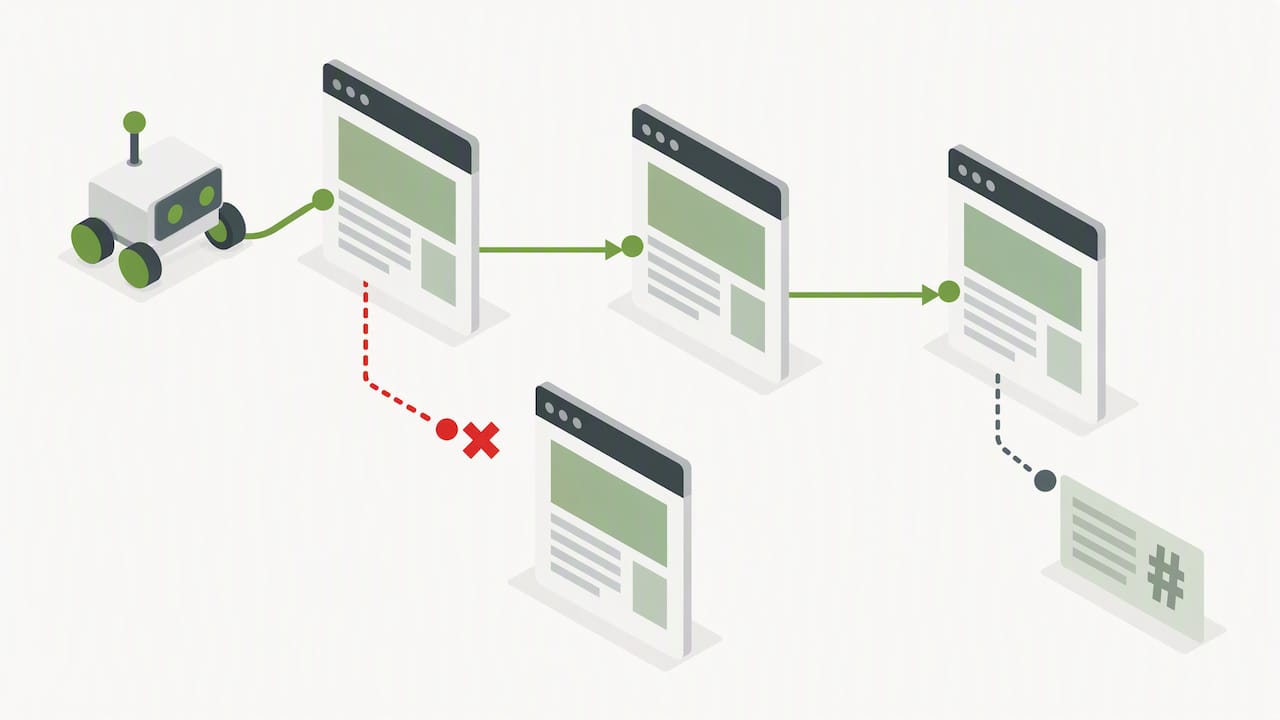
Google hasn't evaluated rel=next/prev for indexing for years, as Search Engine Land already reported in 2019. The markup can still remain useful for accessibility and certain browser functions, but it doesn't replace a clean URL structure.
Bing takes a similar but independent approach. The Bing Webmaster Guidelines emphasize crawl efficiency: XML sitemaps, consistent canonicals, and the use of IndexNow help avoid wasting crawl budget on irrelevant URL variants. Especially for large shops with many filter combinations, this is decisive, because every needlessly crawled parameter combination potentially pushes more important pages out of the crawl cycle.
Concrete SEO best practices for paginated pages
For the technical implementation, there's a manageable number of rules that prove themselves again and again in practice:
- Use a consistent URL scheme such as
?page=2, never fragment IDs after a hash sign. - Set a self-canonical on every paginated page that points to its own URL, not to page one.
- Handle filter and sort variants deliberately: either point to the base page via canonical if they're true subsets, or build a standalone series with its own canonicals if the filtered view should rank on its own, as Search Engine Land describes for complex faceted navigation.
- Submit all paginated URLs via the sitemap and use IndexNow to inform Bing about new pages faster.
- Use prefetch and preconnect solely to speed up loading additional content, not as a substitute for real links.
- Write titles and meta descriptions for series pages distinctly, for example with a note on the page number, so searchers recognize the right sub-page.
A common mistake happens when developers, out of caution about duplicate content, canonicalize all subsequent pages to page one. The result: Google sees only the first page as relevant and ignores the rest of the series, even if unique products or articles sit there.
Pro tip:For every new category page, first check whether subsequent pages carry standalone content before settling on a canonical strategy.
For redirects during URL moves within a paginated structure, take a look at our guide to 301 and 302 redirects, and if you want to optimize title tags for series pages, you'll find additional pointers in our checklist for better findability.
Alternatives to pagination and how to make them SEO-safe
View-all pages combine an entire series on one URL and suit manageable volumes well, but hit load-time limits with several thousand entries. Load-more buttons should always have a real href fallback so crawlers can continue even without JavaScript execution, and should use the History API to visibly update the URL as content loads.
Infinite scroll needs either server-side rendering or a combination of History API and anchor URLs, so that every lazily loaded section gets its own clickable address. Without this technique, lazily loaded content often stays invisible to search engines, as the MDN documentation on the History API describes for the technical implementation.
- View-all suits smaller, manageable lists with a limited number of items.
- Load-more needs a clickable link with a real
href, not just a JavaScript handler. - Infinite scroll requires anchor URLs and History API updates, otherwise subsequent content disappears from the index.
The trade-off between UX comfort and SEO visibility can almost always be solved technically, if you think about it early instead of patching it later.
Implementation checklist and tests: from URL scheme to log file analysis
Before launching a paginated structure, a systematic check is worthwhile, rather than relying on assumptions.
- Check the URL scheme for consistency and make sure no fragment IDs are involved.
- Verify that every page carries its own canonical tag and doesn't accidentally point to page one.
- Make sure robots.txt doesn't block important parameters and the sitemap contains all relevant pages.
- Test individual URLs via the live URL inspection in Google Search Console to verify rendering and indexability.
- Run a log file analysis to see whether Googlebot and Bingbot actually visit all pages in the series.
- Monitor index status, crawl rate, impressions, and ranking trends over several weeks to catch shifts early.
Typical error patterns mostly show up in the same forms: subsequent pages that aren't crawled despite a sitemap entry, canonical chains that accidentally point to the wrong page, or robots.txt rules that block entire parameter areas and thereby waste crawl budget, as also described in our overview of typical SEO mistakes. Complex JavaScript solutions often make these problems worse, since simple HTML links work more robustly than rebuilt navigation logic.
Pro tip:Compare crawl logs before and after every pagination change, before you consider a larger structural switch complete.
A brief agency perspective: user orientation over fragile hacks
From our project experience, one thing shows up again and again: stable user guidance and clean technology beat small ranking tricks in the long run. Anyone who tries to outsmart crawlers with artificial canonical constructions risks losing index coverage as soon as Google's algorithms evolve. A robust URL structure, by contrast, stays stable regardless of markup fads like rel=next/prev that come and go. For complex relaunches or sudden ranking losses related to paginated structures, a technical audit is worthwhile before symptoms turn into lasting visibility losses.
Offer: technical audit and workshops for clean pagination
If paginated categories or filter logic lead to indexing problems in practice, a targeted technical review is worthwhile instead of repeated one-off fixes. Our technical audit concretely uncovers URL structure, canonical logic, and crawl behavior, and ahead of upcoming relaunches, our relaunch safeguarding protects the visibility of paginated areas during the migration.
For teams that want to dig deeper into technical SEO decisions themselves, our workshops offer a hands-on entry point, for example on technical SEO or on planning an SEO-safe relaunch. If you're unsure where your own pagination setup stands, you can check suitable services and prices directly on our SEO services overview page and request an initial conversation.
FAQ
What does pagination mean in the context of SEO?
Pagination refers to splitting long content or lists across multiple pages, each with its own URL. In an SEO context, the point is mainly to structure these pages so that search engines can find, crawl, and index them individually without duplicate content conflicts.
What exactly does the term pagination mean?
Pagination is the technical implementation in which a large body of data, such as a product catalog or an article archive, is divided into numbered sub-pages. Each sub-page typically gets its own URL with a page parameter such as ?page=2.
How does pagination differ from lazy loading?
Pagination splits content into separate, individually addressable pages, while lazy loading loads individual elements such as images only when they reach the visible area, usually within the same page. Lazy loading therefore mainly affects the loading order of resources, not the URL structure of the content itself.
What types of pagination are there?
Common variants are classic numbered pagination with page numbers, load-more buttons that load additional items on click, and infinite scroll, which loads new content automatically as you scroll. Each variant requires its own technical approach so that search engines can capture the full content.
Is rel=next/prev still relevant for Google indexing?
No, according to Search Engine Land, Google hasn't used rel=next/prev for indexing decisions for years. A clean URL structure with a self-canonical fully replaces this markup.
Recommendations
