Logfile‑Analyse SEO: So decken Sie Crawling‑Probleme auf
Log file analysis shows you exactly which URLs Googlebot visited, when, and how. From that we derive concrete decisions: where Googlebot wastes its crawl budget, which technical changes were actually rolled out, and where problematic bot traffic is hiding. No estimates, no sampling, but the complete record of every single request to your server.
Uncovering crawling problems with purpose
SEYBOLD ONE analyzes server logs, crawling errors, and technical SEO problems and derives prioritized measures for your visibility from them.
Get a free consultationWhat is log file analysis for SEO? Benefits and scope
Log file analysis is the systematic evaluation of server logs to reconstruct how search engine crawlers and other bots actually interact with a website. Every line in the log file is a real request, not a model and not an extrapolation. That fundamentally sets this method apart from tools like Google Search Console or classic crawlers, which only ever deliver an excerpt or a simulation.
Search Console shows you aggregated data with a delay and often truncated value ranges. A crawl tool like Screaming Frog simulates how a bot might see your site, but visits the site itself. Log files, by contrast, document what Googlebot, Bingbot, or other crawlers actually requested, with timestamp and status code. That makes them the primary data source whenever it comes to real crawl frequency, crawl budget distribution, or validating technical changes after a relaunch.
The limits of the method matter here: logs show crawling behavior, not rankings. Anyone who wants to know why a page doesn't rank additionally needs ranking data and content analysis. Log files answer a different, often underestimated question: does Googlebot reach the pages that are supposed to rank at all, and how often?
Anatomy of a log entry and common formats
A single log entry looks cryptic at first glance but contains all the information relevant to technical SEO. The Apache documentation on mod_log_config describes the standard format with fields such as timestamp, requested URL, status code, and bytes transferred. In nginx, comparable variables control logging, as the nginx documentation on the log module shows.
The following fields are decisive for SEO analysis:
- Timestamp: Time of the request, important for crawl frequency patterns over days and weeks.
- IP address: Basis for verifying whether a bot really originates from Google.
- User agent: Indicates which client made the request, such as Googlebot or an SEO tool.
- HTTP method: Mostly GET, occasionally HEAD or POST, relevant for API-like structures.
- Status code: Shows whether a request succeeded (200), was redirected (301/302), or failed (404/5xx).
- Requested URL: The exact resource that was fetched, including parameters.
- Response time: How long the server needed to respond, a signal for rendering and performance problems.
- Bytes transferred: Helps identify particularly heavy resources.
A typical Apache entry could look like this: 66.249.66.1 - - [12/Mar/2026:10:15:32 +0100] "GET /products/shoes HTTP/1.1" 200 5423. In nginx the structure looks similar but uses its own variable names in log_format. Server logs also differ from CDN or load balancer logs: the latter also log the requests that never reach the origin server because a cache already answered them at the edge, whereas server logs only capture what actually arrives at the origin server. For a complete view of crawling behavior, you therefore need both sources if in doubt.
Collecting, preparing, and storing logs in a privacy-compliant way
Before an analysis begins, logs from all relevant sources must be consolidated. Pure server logs capture everything that reaches the origin server, CDN logs also capture the requests answered at the edge that would otherwise stay invisible. Anyone using a CDN like Cloudflare or Fastly should include both levels, otherwise a considerable share of bot traffic is missing from the evaluation.
A differentiated view is advisable for retention: for pure SEO analyses, a period of two to three months is enough in practice to recognize seasonal patterns and relaunch effects. A look at public bodies helps as a benchmark for retention: according to the privacy notices of the German Federal Government, the IP address is recorded in the load balancer log file to ensure operations and protect against attacks, and the log files are deleted after 90 days. This period is a sensible upper limit, even if the SEO use case sets somewhat different priorities.
Preparing the raw data typically follows these steps:
- Unify time zones so crawl patterns across multiple server locations become comparable.
- Shorten or pseudonymize IP addresses before data is loaded into an analysis system.
- Normalize log formats when Apache, nginx, and CDN logs use different field orders.
- Filter out redundant or irrelevant entries, such as internal health checks.
- Export to a structured format like CSV or Parquet for further processing.
Pro tip:Store raw logs compressed and separate from the aggregated analyses; that way the deletion period for personal data can be met without losing the analysis results.
Practical parsing tools and workflows for the evaluation
Simple built-in tools are often enough for a first, quick look. A short shell script with grep and awk, for example, filters all lines with the user agent “Googlebot” and counts status codes per day. Python libraries like pandas are well suited to turning such ad-hoc evaluations into a few lines of code, for example to group crawl frequency per URL directory.
For larger websites with several million lines per day, shell scripts quickly hit their limits. A robust pipeline is worthwhile here, for example with Logstash to ingest the raw data, Elasticsearch for indexing, and a dashboard for visualization. Alternatively, logs can be converted into Parquet files and evaluated with distributed query engines, which pays off especially with very large data volumes.
One aspect that is often neglected in tool selection is privacy-friendly web analytics as a complement to pure log file evaluation. Matomo, unlike many cloud analytics tools, can be run on-premise, although according to the notes of the German Data Protection Conference on Google Analytics, shortening the IP address alone does not automatically release you from GDPR obligations. Anyone who configures Matomo so that only part of the IP address is stored and no data flows to third parties stays closer to their own control over the data than with purely cloud-based solutions.
Automation pays off for ongoing work:
- Daily ETL jobs that read in new log files, clean them, and load them into the analysis environment.
- Predefined aggregations per URL segment, status code, and bot type that update daily.
- Saved dashboards that automatically flag deviations from the normal state, such as a sudden rise in 5xx errors.
- Export routines that forward aggregated, already anonymized data to SEO teams without them needing access to raw data with IP addresses.
Anyone who also looks at SEO tool selection in the broader sense will find, in a comparison of Semrush alternatives for Germany, a complementary overview of which software suits which use case.
Pro tip:Build the log file pipeline so that it runs independently of any single analysis tool. That way you can later swap the visualization layer without having to rebuild the entire data preparation.
Which questions do you ask the logs, and what do the answers mean?
A log file analysis doesn't begin with numbers but with precise questions. Anyone who scrolls aimlessly through millions of lines rarely finds the relevant patterns. A fixed set of analysis axes that can be applied to any website makes more sense.
The first question concerns the authenticity of the crawlers. A user agent alone proves nothing, because it can be forged at will. A reverse DNS lookup of the IP address, combined with a forward lookup for confirmation, is more reliable, a procedure that reliably exposes spoofing. Anyone who finds that supposed Googlebot requests actually come from unknown data centers has a solid indication of bot traffic that merely poses as a search engine. More on dealing with such bot traffic and identifying forged user agents can be found in our in-depth article.
The second analysis axis is crawl frequency per segment. Instead of looking at every URL individually, we group by URL directory or content type, such as product pages, category pages, or blog articles. That reveals whether Googlebot spends its time on business-relevant pages or whether most visits flow into irrelevant parameter URLs.
Third, the status code distribution per segment is worthwhile. A high share of 404 responses in a particular directory points to orphaned internal links; our article on handling 404 problems in Search Console offers guidance on fixing such problems systematically.
Further central checks:
- Response time per URL type: Slow response times often correlate with reduced crawl depth.
- Resource fetches: Are CSS and JS files fetched at all, or does a robots.txt block rendering?
- Distribution across subdomains: Does an important subdomain get enough visits at all?
From analysis to action: prioritize, implement, validate
An analysis without prioritization stays academic. We sort findings by the ratio of impact to effort: a problem that ties up a lot of crawl budget and can be fixed with a single rule goes straight to the top of the list. A problem with little impact that requires a complete architecture overhaul moves to the back.
Typical candidates for quick priority are recurring 5xx errors on specific templates, frequently requested JavaScript resources that should actually be cached, and redirect loops that send crawlers into endless chains. We translate such findings into concrete tickets: for developers with the exact URL, status code, and frequency, for the SEO team with the expected impact on crawl budget and indexing.
Implementation follows a clear sequence:
- Document the finding with example URLs and the observation period.
- Specify the fix and hand it over to the development team.
- After the rollout, pull logs again and specifically check the affected URLs.
- Confirm that the status code or response time has changed as expected.
- Set up monitoring that automatically triggers an alert if the problem recurs.
Especially with relaunches, this validation step via logs is often the only reliable confirmation that Googlebot actually crawls the new structure as planned, and not just that a crawl tool would theoretically see it that way.
Pro tip:Set fixed alert thresholds, for example a share of 5xx responses above a certain percentage per day, so regression problems are noticed before they affect rankings.
Privacy in practice for log file analyses: GDPR and TDDDG in everyday work
With the IP address, log files contain a personal data point, even if the sender is a bot, because the same infrastructure usually also logs human traffic. According to the privacy notices of the German Federal Government, typical log fields include browser type, operating system, and IP address, and it is exactly this combination that makes a well-thought-out retention and deletion practice necessary.
The German Federal Government deletes log files after 90 days, mainly for operational security and protection against attacks. For SEO purposes, two to three months are usually enough in practice, as seasonal crawl patterns reliably emerge within that time.
Concrete technical measures that can be implemented in any setup:
- Shorten or pseudonymize IP addresses before logs are loaded into an analysis system.
- Define a clear retention policy and document it in the record of processing activities.
- Restrict access to raw logs to a few people and distribute aggregated reports more widely.
- When choosing tools, weigh on-premise solutions against cloud services, where on-premise offers more control over storage location and deletion periods.
It is important that, according to the notes of the German Data Protection Conference on Google Analytics, simply shortening the IP address does not automatically release you from all GDPR obligations. Anyone who links log data with user devices or adds tracking functions should additionally review the consent requirements of the TDDDG before a tool goes into production.
Forensic practice: checklist and methodological notes from agency work
In forensic work with many clients, a fixed set of checkpoints has established itself that can be transferred to almost any log file analysis. It begins with forming crawl clusters: URLs are grouped by directory, template, or content type to recognize patterns that would be lost in individual consideration.
Right after that comes the check of redirect chains, since multiply nested redirects are one of the most common reasons for wasted crawl budget. Indexing gaps show up just as regularly: pages that are in the sitemap feed but barely visited by Googlebot, a clear signal for internal linking problems.
A third fixed point is creating bot profiles, that is, assigning which crawlers prefer which areas of a website, and whether conclusions about technical barriers can be drawn from this. This methodology is based on a visibility management approach developed according to its own standards in line with DIN SPEC 33461.
Anyone who wants to carry out such a forensic review for their own website will find the right next step in our forensic audit or in a targeted workshop.
Typical case studies and practical examples from log file analysis
In agency practice, certain patterns repeat across industries, even if every website has its own particularities. A recurring scenario concerns online shops with heavily faceted navigation: filter combinations generate thousands of URL variants that Googlebot dutifully crawls without these pages ever being supposed to rank. In such cases, log file analysis makes visible what share of the crawl budget flows into these dead ends, often a surprisingly large one.
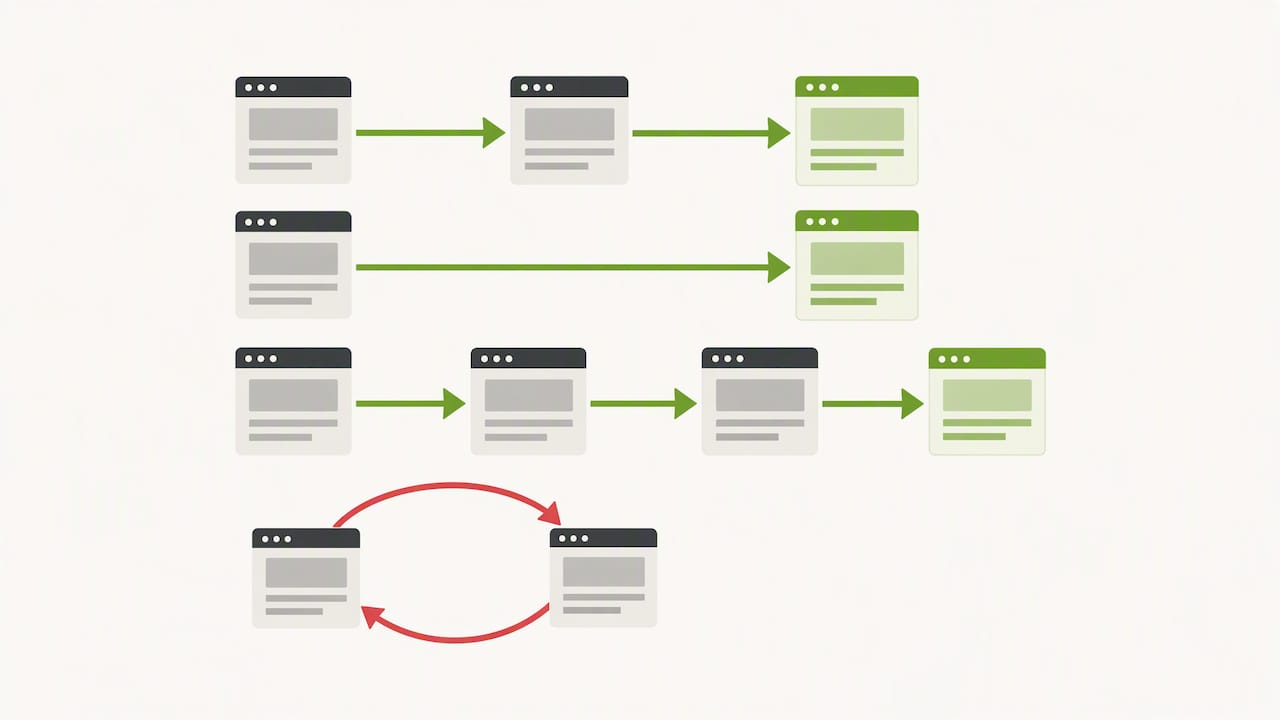
A second common pattern appears after relaunches. New URL structures are created, old URLs are supposed to redirect via 301, but the logs then show that Googlebot keeps requesting the old paths for weeks and partly ends up in redirect loops because a redirect rule was implemented incompletely. Without a log file comparison, this error often stays undetected for months, because the website works normally for human visitors.
A third pattern concerns international websites with several language versions. Here, segmentation by language folder often shows that one particular language version is crawled significantly less often than the others, usually a sign of missing internal linking or a faulty hreflang implementation. In all three cases, log file analysis provides the proof, not just the assumption, and that is exactly what makes it so valuable for prioritizing development resources.
Reading unusual log patterns correctly: crawling errors and bot attacks
Not every conspicuous pattern in the logs is an SEO problem, but each deserves a close look. A sudden, massive rise in requests from a single IP range points more often to a scraping attempt or an automated attack than to legitimate search engine traffic. Comparing against known Googlebot IP ranges via reverse and forward DNS helps here to separate genuine from spoofed bot traffic.
Another pattern is the creeping rise in 5xx errors, often a harbinger of server problems under load that are not yet big enough to trigger monitoring alarms but are already starting to slow crawlers down. Recurring timeouts on certain templates are a similar early warning signal, especially if they correlate with a particular plugin set or a particular database query.
Redirect loops also leave a characteristic pattern: the same IP requests the same URL chain several times within a short period without ever receiving a final 200. And a conspicuously high share of requests to non-existent, random-looking paths usually points to automated fuzzing or security scans, not an SEO topic in the narrow sense, but still a finding that should be passed on to the technical department. Anyone who captures such patterns systematically often recognizes problems weeks before they show up as ranking losses.
What log file analysis really delivers in practice
Most SEO teams overestimate what crawl tools and Search Console reveal about actual bot behavior, and at the same time underestimate how much crawl budget disappears in irrelevant URL dead ends. A log file analysis is not a nice extra for large websites but often the only way to see these blind spots at all.
What convinces me about this method is its sobriety: it delivers no opinion, but facts about what actually happened. Anyone who regularly looks into the logs soon develops a sense of where the biggest levers lie in their own infrastructure, often quite different ones than assumed.
My concrete advice: don't plan a one-off analysis but a 14-day audit with a clear starting point, in which you collect logs, cluster patterns, and turn at least three prioritized findings into tickets. This discipline delivers more than any one-off deep dive without a follow-up process.
Technical audits and forensic analyses for your log file evaluation
Anyone who wants to implement the steps described in this article themselves but lacks time or tooling doesn't have to start from zero. We take over the complete preparation and interpretation of your server logs and deliver, in the end, not a raw data table but a prioritized list of concrete measures.
Depending on the starting situation, different services fit:
- A technical audit for €1,500 to €3,500 one-time systematically uncovers crawling and indexing problems.
- A forensic audit for €1,500 to €5,500 one-time is suitable when a sudden ranking loss or a suspected Google penalty is on the table.
- A relaunch safeguarding from €1,500 one-time validates via log file comparison that a new structure is crawled as planned.
- Our Technical SEO workshop from €500 one-time teaches your team the methodology to carry out log file analyses yourselves in the future.
All services and prices in detail can be found on our SEO costs page, where you can also request an assessment for your project directly.
FAQ
Is there a free SEO analysis tool?
Yes, for first log file evaluations, free built-in tools like shell scripts or Python libraries are often entirely sufficient, supplemented by free crawlers for comparison. An overview of free SEO tools shows which tools suit which starting point.
Which SEO score is good?
A blanket SEO score says little, since tools use different criteria and weightings. More meaningful is a look at concrete technical metrics from the logs, such as the share of successful requests or the crawl frequency on business-critical pages.
Is SEO still worthwhile?
Yes, as long as search engines remain the central entry point for information searches, technical optimization of crawling stays relevant. Log file analysis shows particularly clearly that many visibility problems fail not because of content but because of technical accessibility for crawlers.
What does SEO analysis mean?
An SEO analysis examines how well a website can be found and evaluated by search engines, usually through technical, content, and structural criteria. Log file analysis is a specialized sub-area that concentrates on the actual crawling behavior of bots rather than on content or rankings.
Sources
- Privacy notice / privacy policy – German Federal Government
- Notes on the use of Google Analytics — German Data Protection Conference
- Apache Module mod_log_config — documentation
- ngx_http_log_module — nginx Documentation
Recommendations