
301 vs 302: Which Redirect Is Right for SEO
301 means permanent, 302 means temporary. This simple rule decides how a URL gets canonicalized: Google treats a 301 as a strong signal that the destination address becomes the canonical version going forward, while a 302 keeps the original URL in the index. Choosing the wrong one risks ranking losses, or a URL that never disappears from the index.
Protecting visibility through redirects
SEYBOLD analyzes technical SEO issues like ranking losses and builds data-driven strategies for your digital visibility.
Get a free consultationHow HTTP redirects work technically, and how search engines read them
A redirect is a server response with a 3xx status code and a Location header that tells the client the destination address. The status family differs mainly in the lifespan of the change it signals:
- 301 Moved Permanently: permanent move, link equity travels to the destination address.
- 302 Found: temporary redirect, the original URL stays relevant.
- 307 Temporary Redirect: like 302, but additionally preserves the HTTP method of the original request.
- 308 Permanent Redirect: like 301, also method-preserving.
Google follows redirects as a rule, but only treats permanent variants as a strong canonicalization signal. Redirects work best alongside rel=canonical and an up-to-date sitemap: several consistent signals increase the odds that Google treats exactly the URL you want as authoritative.
When to use 301 redirects (practical rules)
A 301 belongs wherever a change is final and there's no plan to go back to the old URL.
- Domain changes, for example during rebranding or company acquisitions.
- A permanent overhaul of the URL structure, for example after a CMS switch.
- Consolidating duplicate content onto a single, preferred version.
Google's migration guide confirms that link value isn't lost with permanent redirects. What matters is what happens after the redirect: internal links need to point to the new URL, rel=canonical has to be set consistently, and the sitemap has to contain the new addresses, not the old ones anymore. Without this follow-up work, the canonicalization signal stays contradictory even if the status code itself is correct.
Pro tip:Always point the 301 directly at the final destination URL, never at an intermediate address that still redirects itself.
When to use 302 redirects (temporary scenarios, and where to be careful)
A 302 signals that the original URL stays valid and the redirect is only a transitional solution.
- A/B tests, where a variant is shown for a limited time.
- Seasonal or short-term marketing campaigns with time-limited landing pages.
- Maintenance pages that temporarily replace an original address.
For redirect-based tests, Google explicitly recommends 302, so the test variant doesn't displace the original URL in the index. It becomes a problem when a 302 stays in place for months: Google increasingly reads that as an unclear signal, and in the worst case the wrong URL stays canonical while the page you actually wanted stays invisible.
Migration checklist: redirect mapping, avoiding chains, follow-up checks
A migration stands or falls on the prep work, not the redirect rule alone. Google's documentation on site moves stresses that a complete, clean approach is needed, not an isolated set of rules.
- Build a complete mapping: every old URL points directly to its final destination URL.
- Avoid intermediate hops; every extra stop in the chain costs time and raises the error rate.
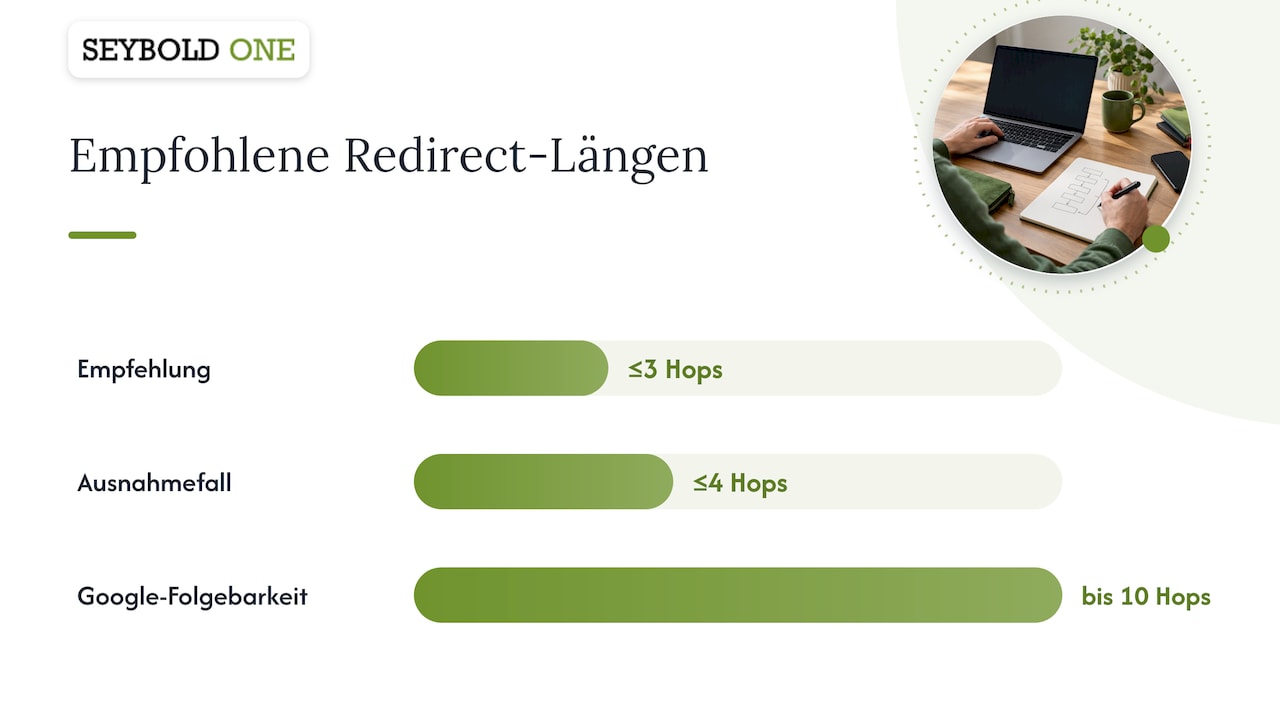
- Limit chains to three steps at most, four in exceptional cases.
- Sync internal links, canonical tags, and sitemaps in parallel with the redirect rollout.
- After go-live, check server logs and ranking trends over several weeks.
Google can follow up to ten hops, but every chain delays signal processing, and some user agents give up before that. A technical setup following the Apache and NGINX standard avoids many of the typical mistakes that only surface weeks after a relaunch.
Pro tip:Export a complete list of indexed URLs before every migration, so nothing legacy gets overlooked in the mapping.
Concrete implementation examples: .htaccess, NGINX, and PHP
Server-side implementation is the fastest way to tell Google the destination, as Google's own examples show.
- Apache (.htaccess), 301:
Redirect 301 /old-page/ /new-page/ - Apache (.htaccess), 302:
Redirect 302 /test-page/ /variant-b/ - NGINX, 301:
rewrite ^/old-page/$ /new-page/ permanent;orreturn 301 https://example.com/new-page/; - NGINX, 302:
return 302 https://example.com/variant-b/; - PHP:
header('HTTP/1.1 301 Moved Permanently'); header('Location: https://example.com/new-page/'); exit();
Server-side redirects are considered the most reliable way to tell search engines the destination of an address change.
More detailed code examples and variants for more complex rewrite rules can be found in the detailed guide to Apache and NGINX.
Checking and monitoring: tools and tests for redirects
A redirect you've set up is only reliable once it's been checked. Several simple tools are suited for this:
- curl on the command line shows the raw HTTP status and Location header without going through a browser.
- Browser DevTools (Network tab) visualize the complete redirect chain, including cache headers.
- Screaming Frog or a comparable crawler finds redirect chains and faulty status codes across the whole domain.
- Server logs show which bots actually trigger which redirect, independent of any crawl tool.
After a relaunch, it's worth using a website checker for follow-up monitoring that keeps an eye on status codes, chains, and cache behavior over weeks instead of just checking once.
Agency perspective: how SEYBOLD diagnoses redirect problems
In practice, most redirect errors come from forgotten intermediate steps during relaunches, not from wrong status codes as such. Preserving the visibility of the most important URLs always takes priority, with bulk fixes in the details following afterward. A technical audit or relaunch safeguarding uncovers gaps like these before going live.

Quick summary: decision criteria in three sentences
Permanent change: always 301. Temporary change: always 302. In migrations, the follow-up work matters just as much as the status code, and only monitoring shows whether both actually worked.
A short perspective from the author
Technical precision with redirects isn't a detail, it's visibility protection. Anyone who neglects it gives away rankings that could otherwise have been preserved.
Support with migration, audit, and monitoring
Anyone planning a domain migration, a relaunch, or a larger URL restructuring rarely faces just a question about status codes — it's usually a whole bundle of dependencies between redirects, canonicals, and sitemaps. Technical audits are offered for error diagnosis, relaunch safeguarding to accompany the transition, and monitoring across multiple answer systems for ongoing checks afterward.
For details on services and pricing, it's worth taking a look at the pricing overview for SEO consulting, where you can request a suitable audit directly.
Sources
For technical verification, it's worth going straight to Google's documentation on redirects, as well as its guidance on website migrations.
- Redirects and Google Search | Google Search Central
- Minimize A/B testing impact in Google Search | Google Search Central
FAQ
When should I use a 301 vs. a 302 redirect?
A 301 belongs to permanent changes such as domain moves or final URL restructuring, a 302 to time-limited cases such as A/B tests or short-term campaigns. Google follows both variants, but only treats the permanent one as a strong canonicalization signal.
What does status code 302 mean?
Status 302 signals a temporary redirect: the original URL stays valid and is meant to remain in the index. Google explicitly recommends this code for redirect-based tests, so the test variant doesn't displace the original address.
What does status 301 mean?
Status 301 stands for a permanent redirect, where the destination address becomes canonical going forward. According to Google's migration guide, link equity isn't lost as long as the redirect happens server-side and points directly to the final destination.
What does 301 stand for?
301 stands for "Moved Permanently" — a resource that has moved for good. The code instructs both browsers and search engines to treat the new address as authoritative going forward, instead of continuing to consider the old URL.
Recommendations
