
Why You Should Use "Google My Business" for Your Company
What is Google My Business?
Google My Business (formerly Google My Places, abbreviated as GMB) - now known as Google Business Profile (GBP) - is a platform provided by Google for businesses to consolidate their business address with various Google services – especially Google Maps, Google Analytics, YouTube, Google Search, and of course Google+. First launched in June 2014, GMB allows businesses to manage all their company information in one central location. This ensures that all information can be quickly and easily kept up to date, as you only need to enter and change it in one place. This centralized hub enables potential customers to find your business quickly. Depending on the device used, listings may be displayed differently.
Not only can people who already know your business and explicitly search for it find the listing. Users who search for your industry and city, for example, can also find your business listing - alongside other competitors in the same field. To use “Google My Business,” all you need is a (free) Google account.
You can sign up and manage your business here: https://www.google.de/intl/de/business/
Google Business Profile as a Business Listing
When people search the web for a specific company, product, or service, they often rely on Google for assistance. The trust in these results is very high. Since new customers often find their way to businesses through the search engine, it is particularly important to use the business listing to ensure that information is always up to date. The Google Maps entries are displayed in the Local Pack. Details about each business are shown on the side.
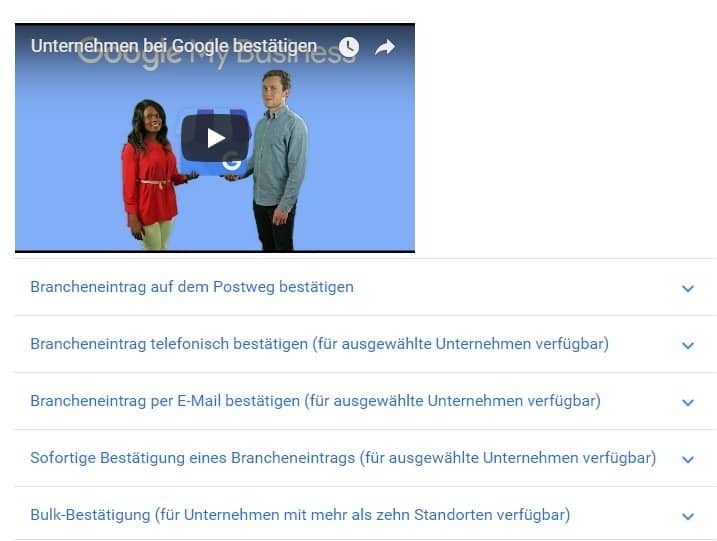
Setting up a Google My Business account is completed in just a few steps – however, to verify as a business page, the following must be noted: You must "prove" that you are the rightful owner of the location. Google will send you a postcard with a code to your address, call you at the phone number you provided and give you the code, or send you the code via SMS. You will only become the admin of the page after entering this code.
Features that Make Google My Business Stand Out
My Business primarily simplifies the use of the entire Google suite - keeping all your company’s data in view. For example, you can create a unified business listing for your company: Once set up, this listing appears across all Google products. The central dashboard offers users numerous additional features, including the following:
- The ability to change, update, or delete business information, such as address or other contact details, as needed.
- The ability to edit, manage existing listings in the "Google Maps" service, or add new locations. Google Maps entries often appear directly in Google search results, making it important for businesses to have a presence there, and it’s also a free advertising opportunity. For most businesses, Google automatically creates these entries.
- Customers can leave reviews and ratings on your Google+ page. From the central dashboard, you can quickly respond to these reviews and keep an eye on new comments. The advantage of these reviews is that they are integrated into search results. New or potential customers can get a comprehensive view of your business. The better your reviews, the more likely you are to convert these customers into your own.
- With one click, you can check how your business appears in Google Search, on Google+, and in Google Maps – making it even easier to spot and fix any errors or optimization opportunities.
Key Points to Consider When Creating a Business Profile
Information and Listings in the Entry:
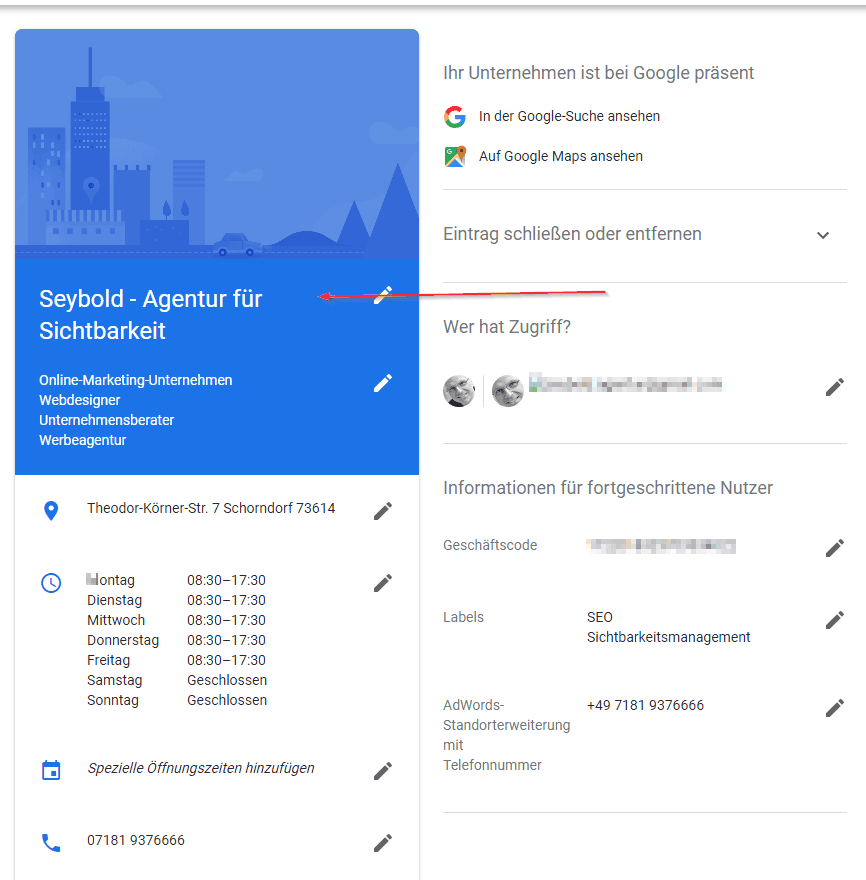
- Ensure all business information is accurate
- Including one keyword in the title is possible, but be cautious - it violates guidelines!
- Check and verify the address (become an admin through code)
Reviews, Questions, and Answers:
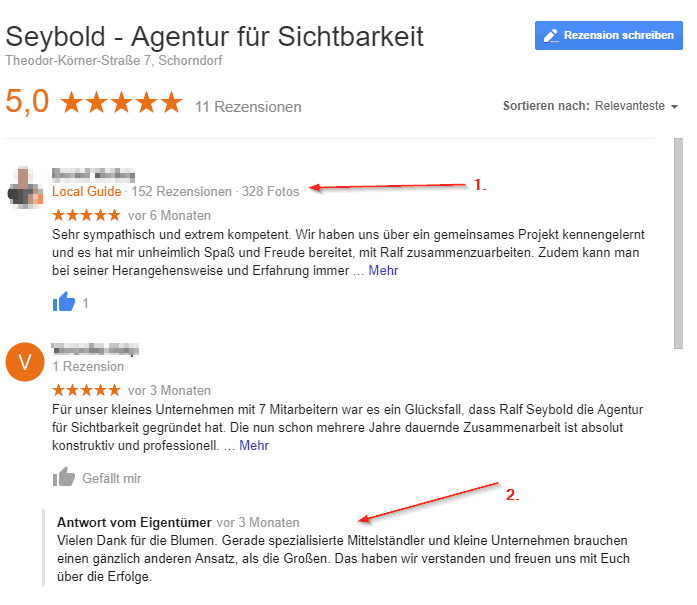
- Ask customers for reviews and encourage them to share photos of your business
- Request reviews from Local Guides (Note! They must have visited your location. A Local Guide from Hamburg, known for never leaving Hamburg according to their Google profile, is not a suitable reviewer for a business in Hanau if they have never been there).
- Respond to questions and reviews
- For negative reviews: don't get upset! Sfc = stay freaking cool ;)
Photos and Videos:
- Add Videos
- Images in every category (Team, Interior, Exterior, etc.)
Website:
- Connect with Google My Business Listing
- Name, Address, Phone must match exactly with GMB listing
- Backlink to the Google My Business listing from the website
What to Avoid in Your Google Business Profile
Information and Listings in the Profile:
- Outdated information (keep it up to date!)
- Multiple keywords in the title
- Fake locations (don't create a fictitious branch in Cologne just because you want one. Google will find out, especially since Google Maps also uses fake streets that don’t exist)
Reviews, Questions, and Answers:
- Arguing with or ignoring customers
- Creating fake reviews
- Leaving negative reviews for competitors
Photos and Videos:
- Fake images
- Images of customers/people without consent
- Reusing the same images
Website:
- Inconsistent information
Duplicate Content in Google Business Profile
In August 2022, Google updated its guidelines for business profiles regarding duplicate content. Duplicate content in posts is now considered spam. Therefore, if you post the same content, use the same images in posts, or reuse the same image multiple times in photos, Google will downgrade your ranking in Google Maps.
Google explicitly warns against reusing images, photos, posts, videos, and logos.
Only Unique Content from Now On
Google sends a clear message to businesses: only unique content should be published going forward.
What does this mean for publishing? For example, if a butcher used the same image for their daily specials every week or day, they must now use different images. You could use large week numbers on the image or show different menus. In any case, avoid using the same image for every post, as it would be considered duplicate content.
The same applies to logos. Your logo should not be used excessively.
How to Easily Comply with Google’s Guidelines
We recommend publishing only unique posts. If the images are similar (or need to be), make sure to change prominent areas of the image so it’s clear that it’s a different picture. Spend some extra time managing your company's photos and remove duplicates.
Conclusion
Google Business Profile (GBP, formerly GMB - Google My Business) offers significant advantages, especially for smaller, local businesses. It allows these companies to be found in major Google services with the most current business data without much administrative effort. At the same time, it also supports large companies and franchises by linking entries to their websites or branches.
Additionally, well-maintained data and the ability to leave customer comments and reviews positively impact interaction, visibility, and search engine ranking of the business, shop, or establishment. Even large companies and franchises benefit from this solution. By linking the business profile with the website, relevance and importance are created.
At SEYBOLD – Agentur für Sichtbarkeit, we take it a step further by extending reach (and, if desired, reputation management) to over 40 directories, navigation systems, and important review portals. This includes making opening hours queryable via voice search (especially Alexa).