
Domainumzug SEO: Rankings sichern ohne Trafficverlust
Yes, rankings can be preserved during a domain move if you create a complete URL mapping in advance, set permanent server-side redirects and submit the new sitemap in Google Search Console. Short-term fluctuations are normal: according to Google, re-crawling and re-indexing the new domain takes weeks to months before visibility stabilizes.
Securing visibility during a domain move
SEYBOLD ONE reviews your domain move technically and shows where rankings and backlinks are at risk.
Get a free consultationDomain change or domain move: which applies to you?
A domain change only affects the target address, whereas a domain move also changes content, structure or hosting. Anyone who merely swaps the ending, for example from an old brand to a new one, faces a more manageable task than someone who replaces the content management system, server infrastructure and URL structure at the same time. Before deciding on a complete move, it's worth looking at alternatives:
- A subdomain separates content technically but remains part of the existing main domain.
- A subdirectory remains part of the same website; with a standalone domain, signals have to be transferred via redirects.
- A complete move mainly pays off for a brand change, internationalization or technical limits of the old platform.
So the decision concerns not only SEO but also brand strategy and long-term technical viability.
Preparation: URL mapping, sitemap and test plan before the move
The URL mapping is the central document of every domain move. Google itself recommends a complete mapping of every old address to every new one, not just for the most important pages. A usable mapping table contains at least these columns: old URL, new URL, HTTP status, canonical target, indexability and priority by traffic or backlink value.
For large websites, sitemap structure comes into play. A single sitemap must not exceed 50,000 URLs or 50 MB uncompressed; larger projects need several sitemaps with a parent sitemap index.
Before the actual go-live, this sequence is recommended:
- Create a new property in Search Console and verify it via DNS or HTML tag.
- Finish the complete mapping and have a second person cross-check it.
- Test all redirects in a staging environment, not only live.
- Manually open samples of the URLs with the most traffic and the strongest backlinks and check the destination.
- Prepare the sitemap of the new domain, but only submit it after go-live.
Pro tip:Don't test only automatically; open the ten most important landing pages manually in the browser, because redirect tools occasionally overlook JavaScript-based redirects.
Setting up redirects correctly and avoiding typical mistakes
For permanent moves the basic rule applies: permanent server-side redirect, not client-side via JavaScript or meta refresh. Google recommends the status codes 301 or 308 for this, since both signal a permanent move and are meant to pass ranking weight to the new URL.
Implementation happens server-side, for example via the .htaccess file on Apache or via the server configuration on Nginx. A detailed guide to generating redirects for Apache and Nginx shows the exact syntax for both variants.
Three mistakes appear particularly often in practice:
- Redirect chains, where URL A points to B and B only then to C, slow down crawling and dilute the signal.
- Blanket redirects of all old URLs to the new homepage instead of the matching target page.
- Canonical tags that still point to the old domain even though the page has already moved.
Three methods work well in parallel for checking: a server log analysis to see which old URLs are still requested, HTTP header checks with tools like Screaming Frog or curl, and automated redirect tests that compare all mapping rows against the actual status code.
DNS, hosting and staging: the underestimated risk factors
Anyone who switches hosts at the same time carries an additional risk that has little to do with the domain itself. With a pure hosting or CDN change without URL changes, DNS settings, staging blocks and the general availability of the site are the critical points, not the domain itself. Google covers this case in a separate guide for moves without URL changes.
With a hosting change, the risks usually lie in operations, not in the domain. These steps help before switching:
- Lower the DNS TTL to a low value in good time before the move so the switch takes effect quickly.
- Completely remove noindex tags and robots.txt blocks of the staging environment before going live.
- Actively monitor server logs in the first days after the switch, not just in spot checks.
- Use 503 status codes only in a controlled and time-limited way if a page has to go offline briefly.
TLD change, hreflang and regional signals
A change of the domain ending, for example from a country-specific to a generic TLD, also changes the regional signal to Google. After such a change, hreflang assignments should be fully re-validated rather than simply carried over.
- ccTLDs such as .de send a stronger country signal than generic endings.
- hreflang attributes must point to the new URLs, otherwise mis-assignments arise.
- An automatic, language-based redirect of users should be avoided, as it complicates crawling and user guidance.
The architecture for region and language belongs in place before the move, not improvised during it.
Go-live checklist: what to check on switch day
On the day of the switch, the smoothness of the rest of the process is decided. This order has proven itself:
- Create a new property in Search Console if not already done, and verify the domain.
- Submit the prepared sitemap and watch the “Page indexing” report over the following days.
- If you are moving to a different domain or subdomain, use the Search Console “Change of Address” tool in the old property.
- Repeat samples of the most important redirects, response codes and internal links directly after go-live.
- Track organic traffic, impressions and crawling errors daily over the first two to three weeks.
- Check server logs for clusters of 404s or unexpected status codes.
The Change of Address tool tells Google about the move and helps migrate your search results from the old site to the new one. It only works for domain-level properties and is not meant for an HTTP-to-HTTPS move or for a pure hosting or CDN change without URL changes. Keep the redirects in place for at least 180 days, according to Google's move guide generally at least one year, and longer for as long as traffic from Google still arrives.
The distinction between normal, temporary fluctuation during re-indexing and a persistent problem is important. If the traffic of an important page drops permanently while others recover, that usually points to a specific technical error and not to a general penalty.
When do rankings return, and what to do about persistent losses?
Recovery time varies by project. There is no guaranteed duration; the speed depends, among other things, on the number of affected URLs and server speed. Realistically, the period ranges from a few weeks to several months, also depending on the strength of external backlinks to the old domain.
If losses persist beyond this period, the cause often lies in one of these points:
- Faulty or missing redirects for some of the old URLs.
- Indexing problems, for example due to noindex tags accidentally left in place.
- Technical blocks in robots.txt that block crawling of the new domain.
Quick repair measures begin with a renewed, complete check of the mapping against the live situation. If the problem persists despite correction, a forensic analysis by specialized consultants is worthwhile, since complex cases are rarely solved by checklists alone.
Why experienced guidance makes the difference for complex moves
For over 25 years we have accompanied visibility projects and helped develop DIN SPEC 33461, a standard for visibility management. For complex domain moves, we use forensic audits to isolate the causes of ranking losses precisely instead of correcting by guesswork. A project belongs in experienced hands at the latest when several domains, languages or legacy systems are affected at the same time.
Preserving and updating backlinks during a domain move
Backlinks don't automatically lose their value during a move as long as the redirect works technically. Even so, active effort beats simply waiting.
First prioritize the backlinks with the highest value: links from high-authority domains, from press articles or from industry directories. For these URLs, the redirect should not only be tested automatically but also followed manually in the browser, including a click on the actual backlink anchor text where possible.
In parallel, direct contact with website operators who link to particularly important pages is advisable. An updated link pointing directly to the new URL, instead of via the redirect, reduces the risk that a link is lost later when the old domain is cleaned up. This mainly concerns partner sites, directory entries and cooperations, where a short note is often enough to get the link adjusted promptly.
For the inventory, it's worth comparing the most important link sources against the mapping table: every URL with a notable backlink profile needs a clear, direct redirect, not a chain via intermediate stops. Directory entries and company profiles in apps and industry portals can be systematically compared and updated using specialized checking tools for business listings, so that even smaller but numerous directory links are not lost.
Complete link preservation can rarely be guaranteed, since not every linking site responds or keeps its page up to date. The combination of technical redirects and targeted outreach to the most important sources nevertheless reduces the risk clearly compared with simply waiting. For the redirects of your most important URLs, you can use our redirect tool, which delivers ready-made 301 and 302 configurations for Apache and Nginx via copy and paste.

Communication with users and partners around the domain change
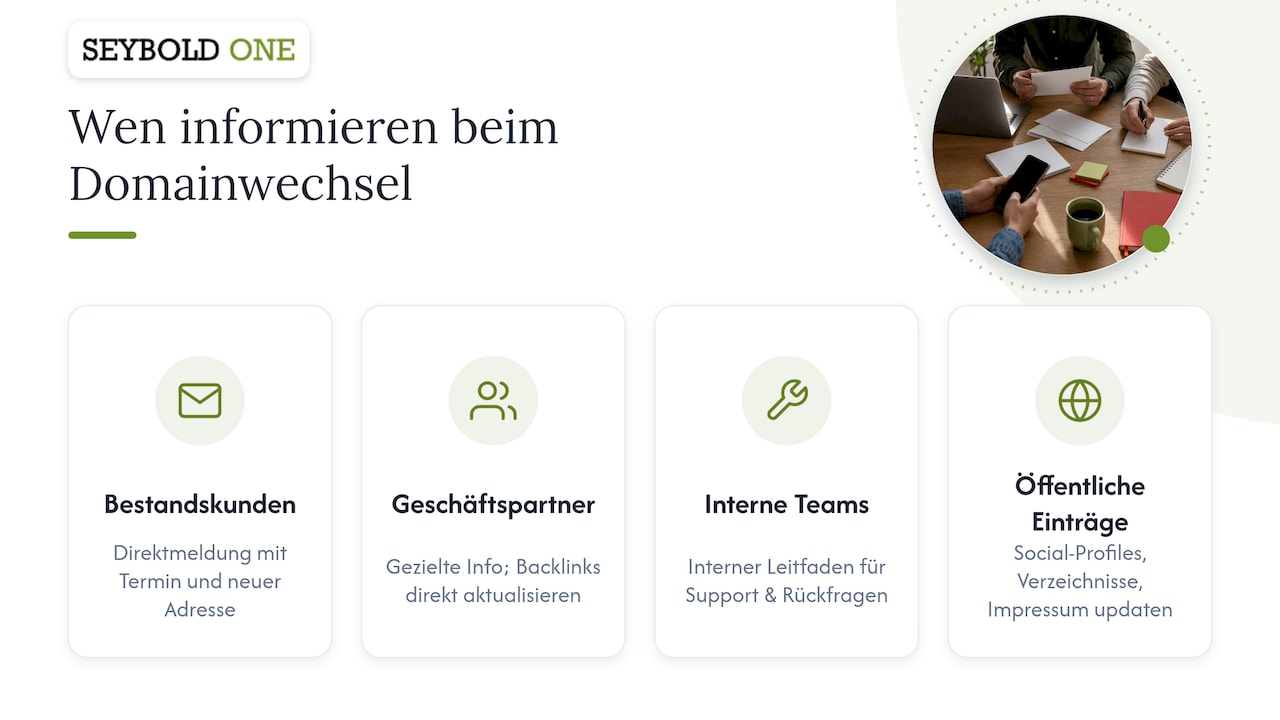
Technical preparation alone is not enough if users and business partners don't know the address is changing. A clear, early announcement prevents confusion and reduces support effort after go-live.
For existing customers and newsletter subscribers, a direct message before the move is advisable, ideally with a concrete date and the new address. Anyone who has sent invoices, contracts or offers with the old domain should update these documents where possible so customers don't fall back on outdated addresses.
Business partners who link to the website or reference it in their own materials, such as cooperation partners, suppliers or industry directories, benefit from targeted information about the upcoming change. This applies especially to partners with high-quality backlinks, where a direct update of the link secures the link value immediately instead of transporting it through the redirect chain.
Internal teams, such as sales or customer service, should also know before switch day which address applies in future and how to handle questions about unreachable old links. A short internal guide with the most common questions noticeably reduces coordination effort in the first days after the move.
Social media profiles, directory entries and legal notice details also belong on the list of contact points to update, since they are often overlooked even though they regularly send visitors to the old domain.
Checking trademark law and corporate identity during a domain move
A domain move is not only a technical project but often also a trademark-law one. Before a new domain is registered and put into production, it's worth checking whether the new domain name touches existing trademark rights of third parties, especially if the brand name changes with the move.
In parallel with the legal check, the new domain needs a consistent adjustment of the corporate identity: logo, color scheme, tone of voice and legal notice should already be aligned with the new address at go-live, not caught up weeks later. A new domain with an old brand presence looks inconsistent to visitors and can cost trust, especially in the first days when many users arrive via old bookmarks or search results.
It is also important to check all legally required information: legal notice, privacy policy and any withdrawal instructions must correctly reference the new domain, since outdated information carries legal risks independent of the SEO project. Anyone combining the domain move with a brand change should also check whether existing trademark registrations or protective rights need to be adjusted before the new domain is communicated widely.
What we would prioritize
In our view, the order decides success: mapping and redirects first, everything else afterwards. Anyone who tries to handle communication, branding and technology at the same time loses track exactly where mistakes are most expensive. Plan changes step by step, and keep capacity free for quick corrections in the first weeks after go-live, because that is exactly where it is decided whether a move runs smoothly or has repercussions for months.
Support with your domain move
A domain move without ranking loss succeeds much more reliably with a partner who knows the sources of error before they arise. For higher-risk projects, relaunch safeguarding, forensic audits and monitoring across multiple answer systems are helpful measures to detect deviations early.
If your move affects several domains, languages or a complex CMS, take a look at our services:
- Relaunch safeguarding for technical support around go-live.
- Forensic audit if ranking losses have already occurred.
- Workshops on technical SEO for teams that want to build in-house expertise.
You can find details on services and prices on our overview of the costs of our SEO services.
FAQ
What does a domain move cost?
The pure costs for domain and hosting are usually low; the real effort lies in planning, mapping and technical implementation. Anyone looking for agency support will find, for example, our relaunch safeguarding from €1,500 one-time as an entry point for technical support.
What happens to emails during a domain move?
Email addresses under the old domain only keep working if the associated MX records point correctly to the new or existing mail server. With a pure hosting change without a domain change, email traffic usually remains untouched as long as the DNS records are carefully transferred.
How do I move my website domain?
The safe way is a complete URL mapping, permanent 301 or 308 redirects at server level and submitting the new sitemap in Google Search Console. This is followed by a phase of intensive monitoring of traffic, crawling errors and rankings over several weeks.
